http://id.nowgoogle.com/
MOST HOT TIPS AND TRICK
- Bikin Software Trial Jadi Seumur Hidup

Ouww masa trial software sudah habis.... Pengen cari crack atau keygen nya susah juga apalagi untuk cari Serial Number nya, ehh ternyata ada juga solusi nya untuk mengatasi agar masa trial bisa jadi selamanya alias seumur hidup..
Begini cara nya... Read more >>


- Meningkatkan Kinerja Komputer

Langsung saja tidak usah kelamaan. Beberapa tips meningkatkan kinerja komputer yang mudah-mudahan berguna buat anda. Tips tersebut sebagai berikut :
Begini cara nya... Read more >>


Tampilkan postingan dengan label computer software. Tampilkan semua postingan

7 Februari 2010

Install Block untuk perlindungan komputer | FREE

Buat yang tidak mau kalo computer nya di install apapun oleh orang tanpa tanpa ijin dari yang punya bisa memakai ini, kalo untuk warnet memang sangat diperlukan selain memakai DeepFreeze. Untuk yang mempunyai warnet dengan ini biar user tidak macam-macam asal instal di komputer client. Software ini sudah sekalian dengan crack nya jadi tidak usah bingung cari crack nya. Silahkan download dibawah ini :
Install Block last version secara gratis

Notes :
Software ini bisa dikasih notice juga, jadi misal kalo ada user atau temen mau instal software lain bisa nongol tulisan "untuk melakukan installasi software silahkan hubungi bla bla bla, mohon maap atas ketidaknyamanan ini terima kasih"
Bisa di edit terserah dengan tulisan yang diinginkan.

Tertarik? silahkan di coba secara gratis dan full version.
read more...

3 Februari 2010

Block situs porno dengan mudah | Tips | Free

Marak nya situs / web porno yang ada sekarang ini mugkin membuat pusing para orang tua atau lainnya, setiap kata Sex, xxx atau lainnya yang berbau porno yang diketik di Google.com selalu di temukan. Beberapa pencegahannya pun telah dilakukan oleh yang terkait. Anti-Porn bisa menjadi alat pencegahan terhadap site-site yang berbau pornografi, harga ini software kurang lebih $39.95. Silahkan download secara gratis Anti-Porn di bawah ini :

Download Anti-Porn + Patch

Download Anti-Porn Pro + Patch

Untuk Referensi nya :
Multilingual contents filtering - Anti-Porn supports real-time filtering or blocking porn websites, which is writed in English, Japanese, Korean, Russian, German, Franch, Spanish, simplified Chinese, traditional Chinese. AI to restrict games - Anti-Porn can determine which program is a game by itself. The parents needn't to add any game to a blacklist. Hide completely - You could not find Anti-Porn whether in the explorer or in the task manager. Everyone could not close or remove Anti-Porn without password.

Main features:
- Block porn web sites
- Anti-porn blocks thousands of porn web sites and predatory words.You also can predefine thing you don't let kids to see, for example, web site and offensive words.At the same time,you can control the filtering accuracy.
- Limit internet chat.
- Anti-porn can limit many popular chatting softwares and web chat chambers.
- Limit internet access by day and time.
- PC Time control.
- You can easily assign internet access time at certain hours, even on specific day. A special feature of Anti-Porn is that the PC time will be calibrate as Greenwich Time.
- Keep a complete log of the computer history
- Anti-porn keeps a detail log of all web sites visited, blocked or not.
- Record traffic data for an overview of internet use
- You can take an inventory of your children's computer, and find all pictures, movies, music files and web pages.
- Commend trusted web sites
- Anti-porn has commended several websites, which are fit for children. You also can add in any others.

OS: Windows7, Vista, and XP
atau bisa ke SINI

Notes :
Software ini visible... kelemahannya muncul reminder dan Blue Coat K9 jika mendeteksi site porn.

Monggo dan hindari site porno buat yang masih belum berumur... heuheuheueh
read more...

Kembalikan data / file yang terformat atau di delete | tips

Ada beberapa software yang mungkin bisa mengembalikan file / data yang telah terhapus di FDD atau lainnya. Tapi bagaimnana jika ada file yang penting keliru di hapus / terformat? coba memakai ini.

Disk Digger adalah alat yg fungsinya me-recovery/ mengembalikan file atau data yg sudah di hapus atau tidak sengaja ter-format.
File yg bisa di recover lagi antara lain :
  • picture (jpg, gif, ico, bitmap, dll)
  • document (txt,word,exel,pdf, dll )
  • entertaiment (mpe3, mp4,3gp,wav ,midi, dll)
Jika data/file yg dicari sudah ketemu tinggal klik save aja..
dan yang paling enak ini software Free

Link :
Download disini
read more...

30 Januari 2010

Main game tanpa harus pakai VGA | 3D-Analysis Free

Sudah pagi ternyata, apakah ada dari temen-temen yang suka main game? pasti ada, jarang banget yang ga ( lagian bisa untuk ilangin suntuk ) tapi bagaimana jika ingin main game dengan spesifikasi game yang tak terdukung oleh pc temen-temen, misal nya VGA tidak mendukung untuk spec game nya. Pengen beli VGA tapi kantong tipis. Ini ada semacam software buat solusi main game biar VGA nya mendukung untuk spec game biarpun spec game nya 512Mb tapi temen-temen hanya memakai VGA 32Mb. Langsung saja deh nama ini software 3D-Analysis dan software ini free download
Apa itu 3D-Analysis?
3DAnalyze is a powerful application that allows to play many DirectX based games using video hardware officially unsupported and theoretically unable to run these; in this guide I'will show you how to install and configure 3D-Analyze main settings, depending on the title you want to play.

First let me explain link among video cards generations and supported Microsoft DirectX versions. This point is crucial for us because changing DirectX versions also hardware compatibilty requests change.
DirectX 5.0 and 6.0 Compliant Cards

This category contains video cards made from 1995 to 1999. For example all 3dfx cards, most video cards from Intel, SiS and S3 Graphics.

DirectX 7.0 Compliant Cards

This category includes video cards made from 1999 to 2001. Main features of this generation are: hardware units for Transform and Lightning (T&L) computation, and Bump Mapping support. For example you can think to Radeon 7000, GeForce, GeForce 2, and GeForce 4 MX cards.

DirectX 8.0 Compliant Cards

This category contains graphics controllers made from 2001 to 2003: these have hardware support for pixel and vertex shader up to version 1.3. Ex. GeForce 3, and GeForce 4.

DirectX 8.1 Compliant Cards

This category includes some video cards, mainly by ATI, made from 2001 to 2003 and with hardware support for pixel and vertex shader up to version 1.4. For example Radeon 8500, Radeon 9000, Radeon 9150, Radeon 9250, and XGI volari v3 belong to this set.

DirectX 9 Compliant Cards

This category contains video cards made since 2003. Main features of this generation are: hardware units for pixel and vertex shader up to version 2.0. For example you can think to Radeon 9x00, Radeon Xx00, Radeon X1x00, GeForce 5x00, GeForce 6x00, GeForce 7x00, and XGI Volari V5/V8.

Begini cara kerja ini software, misal saya mainin game NFS-underground
spek kompi yang saya pakai :
1GB DDR RAM
Pentium 4 (2.4 GHz)
Onboard Graphics Card (Intel) with 64 MB graphics memory

Setelah pake software ini...menjadi :
1GB DDR RAM
Pentium 4 (2.4 Ghz)
ATi Radeon 9800 Pro with 256 MB graphics memory.

Bagaimana cara nya? ikuti langkah di bawah ini :
1. Download dolo software nya
Download sini

2. Langsung lakukan INSTALASI
3. Sekarang pilih file .exe dari game yang ingin dimainkan...kalo tidak tau silahkan klik kanan dari icon di dekstop >> properties >> find target
4. Setelah ketemu pilih OPEN
5. Jika hal tersebut sudah dilakukan dilanjutkan dengan LOADED
6. Sekarang isi dibawahnya VendorID = 4098 dan DeviceID = 20040 – artinya kita pake emulator ATi Radeon 9800 Pro graphics card.
7. Klik SAVE BATCH FILE
8. Run and Play the game..

Untuk referensi nya :
Homepage

Notes :
  • harap perhatikan resolusi dekstop.
  • hanya untuk VGA yang terbatas.

Moga bisa membantu.
read more...

28 Januari 2010

CC Cleaner 2.28.1091 last version | Free Software

Selain untuk membersihkan file sampah juga bisa membersihkan file yang ada di registry ... CCcleaner bisa di andalkan untuk hal tersebut, silahkan download secara gratis versi terbaru dari software ini.

Untuk versi terbaru v2.28.1091 | 28 jan 2010 ada beberapa yang ditambahkan, antara lain :

  • - Added support for custom locations for applications.e.g. CustomLocation1=FIREFOX|C:\MyFirefox\Profile
  • - Improved detection and cleaning algorithm for new releases of Mozilla based browsers.
  • - Added news tasks to W7 jumplist.
  • - Added new command line parameters: /CLEANER, /REGISTRY, /TOOLS and /OPTIONS.- Improved MUI cache cleaning for Vista and Windows 7.
  • - Added drive information to Wipe Free space status.
  • - Improved Wipe MFT free space routines.
  • - Improved W7 toolbar feedback.
  • - Improved several core processes and routines.
  • - Improved file search algorithm when recursing.
  • - Added support for cleaning Paint Shop Pro 12.
  • - Improved support for IZarc and Axialis IconWorkshop.
  • - Minor GUI tweaks.


Homepage

Silahkan di unduh jika diperlukan...
Download for free

Untuk versi portable nya :
Download Portable

enjoy
read more...

27 Januari 2010

Check registry computer secara instant | Free download

RegistryBooster adalah jawaban yang mudah untuk semua masalah registri Windows Anda. Perangkat lunak yang mendapatkan penghargaan ini dimulai dengan melakukan scan dalam registri Anda, memeriksa kesalahan dan ekstensi file registri lain konflik.

RegistryBooster kemudian akan memperbaiki atau menghapus tidak digunakan, file rusak dan berbahaya sehingga mengoptimalkan kinerja PC Anda. Anda kemudian dapat menggunakan scan biasa untuk menjaga registri Anda terstruktur dan mempercepat PC Anda pada puncak sepanjang efisiensi. Dengan RegistryBooster Anda akan melihat langsung peningkatan kinerja dan penurunan sistem konflik.

RegistryBooster adalah yang paling aman dan paling terpercaya solusi untuk membersihkan dan mengoptimalkan sistem anda, membebaskan dari kesalahan dan terfragmentasi registri entri. Menggunakan teknologi canggih deteksi error, secara otomatis mengidentifikasikan RegistryBooster hilang, rusak atau mungkin berbahaya item dalam registry Windows Anda, secara dramatis meningkatkan kinerja dan stabilitas umum.

Pernahkah Anda memperhatikan bahwa semakin lama anda memiliki komputer, semakin lambat dijalankan dan semakin crash? Seringkali ini karena setiap kali Anda menginstal atau menghapus perangkat lunak, menambah atau menghapus perangkat keras, atau mengubah setting komputer Anda, Windows registry diperbarui. Perubahan ini dapat meninggalkan registri terfragmentasi, dengan usang, rusak dan, dalam beberapa kasus, file berbahaya. Seiring waktu registri mulai tenggelam dan konflik muncul. Dibiarkan tak terkendali, sistem anda akan menjadi semakin tidak stabil, berjalan lebih lambat dan lebih sering crash.

Satu mouse klik dan bersih registri kami akan melakukan sisanya. Dan menggunakan secara teratur terus RegistryBooster PC bebas dari kesalahan dan dari usang, tidak terpakai atau file yang tidak diinginkan. RegistryBooster dipercaya oleh pakar TI PC rumahan teknisi dan pengguna di seluruh dunia untuk menyelesaikan semua masalah kinerja berdasarkan registry..

Untuk fitur RegistryBooster dibawah ini :
  • Bersihkan Sistem Anda dan Meningkatkan Kinerja. Meningkatkan kinerja sistem dengan membersihkan semua hilang, tidak diinginkan, usang dan korup entri registri secara otomatis dengan RegistryBooster.
  • Repair Your PC dan Keep It Tuned. Secara dramatis meningkatkan pengalaman komputasi anda dengan cara memperbaiki semua masalah dan meminimalkan registri aplikasi kejang-kejang dan crash.
  • Exceptionally Simple to Use. Tetapkan yang sangat intuitif, menarik, logis dan user-friendly graphical user interface, Uniblue's registry cleaner menetapkan standar untuk kemudahan penggunaan.
  • Lebih Scanning Pilihan. Karena perbaikan yang telah dilakukan ke mesin pemindaian Anda sekarang dapat memindai lebih bagian dalam registri.
  • Sebuah Daftar Abaikan. Ini adalah fitur yang cukup inovatif dan sangat berguna bagi para pengguna yang ekstra hati-hati dengan registri. Dengan menentukan bagian registry dan path pengguna akan dapat mengecualikan registri bagian dari scan.
  • Log Generation. Menampilkan transkrip dari semua tindakan yang dilakukan pada registri dengan operasi memperbaiki tertentu. Sangat membantu bagi para pengguna yang ingin mengetahui apa yang telah dilakukan untuk mereka registri.
  • Windows Vista Compatible. Sekarang RegistryBooster sepenuhnya kompatibel Windows Vista dan masih dapat dijalankan pada Windows XP. Program ini secara otomatis menyesuaikan diri sesuai dengan versi sistem operasi Anda sehingga Anda tidak perlu mengkonfigurasi pengaturan secara manual.
  • Aman dan Terpercaya. Hindari crash, kejang, lambat down dan pesan kesalahan dengan yang paling aman dan paling terpercaya solusi dari vendor perangkat lunak terkemuka. .
Kesimpulannya software ini untuk membersihkan sampah registry di windows biar windowsnya fresh

Tertarik? silahkan download di bawah ini secara gratis :
Uniblue Registry Booster 2010

read more...

26 Januari 2010

Temp File Cleaner | Delete Sampah HDD dengan cepat | Free Software

Bingung atasi size HDD yang sudah penuh? sayangkan jika ada file penting harus di delete / uninstall. Ni ada software gratisan ( pasti banyak yang mau, saya juga mau kalo mbahas tentang gratisan ) dijamin aman dan tidak merusak system. Untuk cara penggunaan nya ada di READ-ME dibawah ini, cara nya pun sangat gampang.. Langsung saja deh...


Delete Sampah HDD with Temp Cleaner
software ini portable alias tidak usah instal-instal langsung saja untuk melakukan eksekusi file dalam HDD...


delete sampah hdd secara cepat, spinningvbree.blogspot.com

READ ME :

Temp File Cleaner v3

Copyright 2009 - ADDPCs

http://software.addpcs.com

Temp File Cleaner is designed to quickly remove as many unnecessary files as possible from a hard drive. Described below are all of the areas cleaned, as well as the purpose of each of the options in the options menu. This software is made available free of charge for personal use. For information on commercial licensing, visit http://software.addpcs.com.

Use this software at your own risk! This software is designed to thoroughly and completely remove temporary files from a hard drive based on directory paths and names. While this software has been designed to only remove files from directories that are known to be safe to delete, if you saved something of importance to one of these directories, IT WILL BE DELETED.
YOU HAVE BEEN WARNED.

---------------

Variable Paths:

%root% - Directory corresponding to the root of the target to scan. Usually a drive letter such as c:\, but optionally any directory on any drive (see Advanced Options).

%windir% - Directory corresponding to a Windows installation directory. usually %root%\windows. Program will scan all matching windows directories on drive.

%userdir% - Directory corresponding to the windows users' home directories. All user directories in %root% will be cleaned, not just the current user.

-----------------

Cleaning Options:

The default options will enable all of the cleaning options except for Brute Force deletion, Windows Prefetch, and Excessive Search. The following are modifiers to the defaults.

--all
This will enable all options, including those disabled by default. This negates any modifiers that come before it, and therefore should always be first.

--none
This will disable every option, including those enabled by default. This negates any modifiers that come before it, and therefore should always be first.

Modifying command line flags are listed as [enable, disable].

[+env, -env] Use Environment Variables
- Uses the environment variables stored in the registry as additional directories to scan. These include %TEMP%, %WINDIR%, and %USERPROFILE%.

[+tif, -tif] Delete Temporary Internet Files
- Deletes IE files in %userdir%\Local Settings\Temporary Internet Files, as well as FireFox cache data in %userdir%\%appdata%\.

[+winupd, -winupd] Delete Windows Update Cache
- Deletes all of the folders in %windir% that start and end with a $, as well as %windir%\*.log.

[+recent, -recent] Delete Recent Files
- Deletes shortcuts from %userdir%\Recent.

[+recycle, -recycle] Empty Recycle Bin
- Deletes files from %root%\RECYCLER,%root%\$RECYCLE.BIN, and %root%\RECYCLED

[+user, -user] Delete User Temp
- Deletes files within %userdir% where temp data is stored. Dirs include:

%userdir%\Local Settings\Temp

%userdir%\AppData\Local\Temp

%userdir%\Application Data\Microsoft\Windows Defender\Scans\History\Results

%userdir%\Application Data\Spybot - Search & Destroy

%userdir%\Application Data\Macromedia\Flash Player

%userdir%\Application Data\Sun\Java\Deployment\cache

%userdir%\Application Data\Azureus\logs

%userdir%\Application Data\Microsoft\Dr Watson

%userdir%\AppData\Local\Microsoft\Windows\Burn

[+wintemp, -wintemp] Delete Windows Temp
- Deletes files from %windir%\Temp, %windir%\system32\wbem\Logs, and
%windir%\Debug, %windir%\Security\Logs

[+cookies, -cookies] Delete Cookies
- Deletes files from %userdir%\Cookies, as well as FireFox cookie data.

[+history, -history] Delete History
- Deletes files in %userdir%\Local Settings\History, as well as FireFox history data.

--------------------------

Advanced Cleaning Options:

Command line flags are listed as [enable, disable].

Using these options should not be very dangerous on a healthy OS, but may have some unwanted effects. These options can always be used on a drive that needs a data backup and will not be used afterwards.

+svi, -svi] Delete System Restore Data [
- Deletes files in "%root%\System Volume Information". This option should only be used if the OS is in a healthy state, and there will be no need to return to a previous state.

[+prefetch, -prefetch] Delete Windows Prefetch
- Deletes files from %windir%\Prefetch. These files normally do not need to be deleted, and doing so will have an adverse effect on the launch times of frequently used applications(temporarily).

[+excessive, -excessive] Excessive Search of Subdirectories
- This feature is useful only when cleaning a drive that has been broken into folders for a data backup using my data backup utility (http://software.addpcs.com). This causes the scanner to search all level 1 directories within the %root% as if they were the root directory.

[+brute, -brute] Brute Force Deletion
- Use this option if the file permissions are blocking drive access. This will give ownership of the target files to the current user, change the file permissions to allow deletion, and then delete the files. This option is disabled by default only because it slows the process down. The only files that cannot ever be deleted are those that are currently in use by another application. Close all running applications for best results.

--------------------------

Command Line Options:

--auto
Will automatically start scanning when launched.

--autoclose
Terminates application when scanning finishes.

--nogui
Does not display the graphical user interface. Implies --auto and --autoclose.

--path=[full pathname]
Scan Path as Root. This option allows any path to be scanned as if it were the root directory of a drive. It sets the root scan path to the given directory. Paths with spaces should be enclosed in quotes. Do not include the brackets[]. This is especially useful in combination with the Excessively Search Subdirectories option. If you have the data from one drive backed up to a directory on another drive, and want to eliminate the temporary files from it, this is the option to use.

--log=[log file path]
All standard output will be written to the file specified. Do not include brackets[]. Paths with spaces should be enclosed in quotes.

--console
This is a flag to the executable that signals that output should be printed to the console. Use this option when using --nogui if you want to see any output at all.


Example Command:

tempCleaner.exe --nogui -cookies --path=c:/ --log=”C:\Workspace\Cleaning Logs”

This will run the cleaning engine on drive C without showing the GUI, using all of the default options, but saving cookies. A log file will be written; note use of enclosing quotation marks.

Link :
Download sini aja jangan kemana-mana

notes :
klo mo restore piont-nya tidak ingin dihapus bisa lakukan di setting bagian systemrestor nya jangan dibei tanda centang...

enjoy
read more...

HD Tune v4.01 Full Version | FREE

HD Tune Pro v4.01 adalah versi lanjutan dari HD Tune 4.00 yang mencakup banyak fitur baru seperti: benchmark write, AAM setting, folder penggunaan tampilan, disk monitor, perintah parameter dan file benchmark.

HD Tune Pro adalah utilitas harddisk yang memiliki fungsi-fungsi berikut:
»Benchmark : mengukur kinerja HDD tingkat rendah (baca / tulis)
»File Benchmark : mengukur kinerja file (read / write)
»Info : menampilkan informasi secara rinci
»Health : memeriksa status kesehatan dengan menggunakan SMART
»Error Scan : memindai permukaan untuk kesalahan
»Erase : aman menghapus semua data dari disk
»Disk Monitor : monitor akses disk
»Folder View : menunjukkan penggunaan ruang disk untuk setiap folder
»AAM : mengurangi kebisingan atau meningkatkan kinerja dalam search
»Menampilkan Suhu HDD

Link :
Download HD Tune

Download Crack

ChangeLog :
- Added option to monitor health status during tests
- Fixed display issue with high DPI font settings


Perbedaan HD Tune Pro n HD Tune Free..
Ini dia beda nya :

http://spinningvbree.blogspot.com/ 

Ingin tau kegunaan dari software ini?
berguna banget buat ngetes kalo mau beli laptop / notebook second dan sangat disarankan untuk check :
1. file benchmark
2. error scan (jangan pake yang Quick, biar puas)

moga bisa membantu....enjoy
read more...

20 Januari 2010

Bikin Semua Software Trial Seumur Hidup | Program

Ouww masa trial software sudah habis.... Pengen cari crack atau keygen nya susah juga apalagi untuk cari Serial Number nya, ehh ternyata ada juga solusi nya untuk mengatasi agar masa trial bisa jadi selamanya alias seumur hidup..
Begini cara nya...

* Download dolo disini :
sini aja download nya
Karena didalam nya ada 2 buah file maka pilihlah yang APPLICATION
* Jika sudah silahkan di isi Browse program yang ingin di perpanjang masa trial nya..
* Buatlah icon tiruan pada kolom yang telah tersedia dan boleh dikasih nama terserah..
* Done...

Sebagai contoh nya :
Misalnya program sisa trial tinggal 30 hari besok nya di buka lagi bakalan 30 hari trial nya (alias trial selama lamanya ) gimana? heheheheh

Selamat menikmati deh masa trial tanpa henti...
read more...

15 Januari 2010

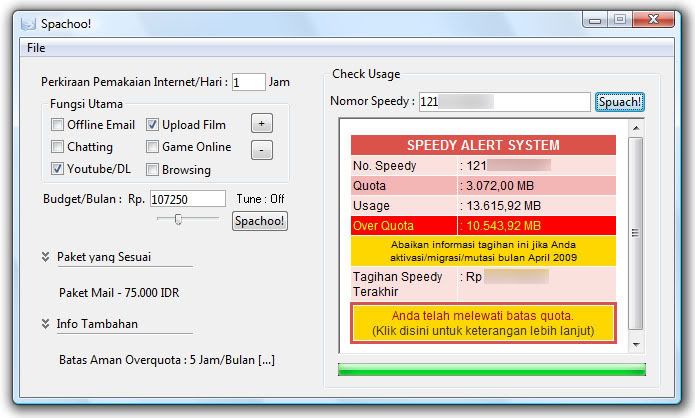
Spachoo | Speedy Tool


Mungkin ada temen" blogger yang menggunakan koneksi Speedy nah berhubung saat ini pihak telkom selaku pemilik Speedy menyediakan banyaknya paket" untuk ber-internet ria atau berselancar di dunia maya ( bukan maya yang jualan di warteg ) sudah saat nya pelanggan Speedy menggunakan aplikasi / software yang membantu memilih paket mana yang efiktif untuk di gunakan.. Saat ini ada software yang namanya Spachoo yang bisa membantu user/calon-user untuk memilih kira-kira paket mana yang paling efektif untuk Telkom Speedy... recommended ini kayanya, dan working di OS windows Xp, Vista, Windows 7, Server 2008, silahkan download software tersebut di bawah ini :
Download Sini

Selamat memilih paket yang efektif
read more...

14 Januari 2010

HDD Regenerator 1.71 $39.95 tapi ini GRATIS

Bagaimana mengatasi bad sector HDD?? dengan ini bisa di Fix error atau bad sector pada HDD...jadi silahkan ambil jika ga pengen kebingungan ngatasi bad sector pada HDD...mudah penggunaan nya...


Fitur program:
Kemampuan untuk mendeteksi bad sector fisik pada permukaan hard disk.

Kemampuan fisik untuk memperbaiki bad sector (kesalahan magnetik) pada permukaan harddisk.

Produk mengabaikan sistem file, scan disk pada tingkat fisik. Hal ini dapat digunakan dengan FAT, NTFS atau sistem berkas lainnya, dan juga dengan unpartitioned diformat atau disk.

Proses mulai langsung di bawah Windows XP / Vista.

Regenerasi bootable flash dapat diciptakan dari program dan digunakan untuk secara otomatis memulai proses regenerasi.

Regenerasi bootable CD memungkinkan memulai proses regenerasi di bawah DOS secara otomatis.

Keuntungan utama

Hard disk drive merupakan bagian integral dari setiap komputer. Ini menyimpan semua informasi Anda. Salah satu cacat yang paling umum adalah dari hard drive bad sector pada permukaan disk. Bad sector adalah bagian dari permukaan disk yang berisi tidak dapat dibaca, tapi sering informasi yang diperlukan. Sebagai hasil dari sektor buruk Anda mungkin mengalami kesulitan untuk membaca dan menyalin data dari disk, sistem operasi Anda menjadi tidak stabil dan akhirnya komputer Anda mungkin tidak dapat boot sama sekali. Ketika sebuah hard drive rusak dengan bad sector, disk tidak hanya menjadi tidak layak untuk digunakan, tetapi juga anda kehilangan informasi yang disimpan di dalamnya. TheHDD Regenerator dapat memperbaiki hard disk yang rusak tanpa mempengaruhi atau mengubah data yang ada. Sebagai hasilnya, sebelumnya tak terbaca dan informasi tidak dapat diakses kembali.

Cara kerjanya

Hampir 60% dari seluruh hard drive bad sector rusak dengan salah magnet memiliki permukaan disk. Kami telah mengembangkan sebuah algoritma yang digunakan untuk memperbaiki kerusakan permukaan disk. Teknologi ini hardware independen, mendukung banyak tipe hard drive dan perbaikan kerusakan yang bahkan tingkat rendah memformat disk tidak bisa diperbaiki. Akibatnya, informasi terbaca sebelumnya akan dikembalikan. Karena cara perbaikan dilakukan, informasi yang ada pada disk drive tidak akan terpengaruh!

HDD Regenerator dapat memperbaiki drive anda?

Hampir 60% dari hard disk yang rusak dapat diperbaiki oleh regenerasi. Anda selalu dapat mendownload versi demo gratis dan mencoba untuk menumbuhkan pertama ditemukan bad sector. Tujuan utama dari versi demo terdaftar adalah untuk menampilkan laporan yang berisi informasi tentang kemungkinan untuk menumbuhkan seluruh disk dengan cara yang terdaftar versi lengkap. Jika pertama ditemukan bad sector telah berhasil dibuat ulang, Anda dapat membeli produk untuk menumbuhkan semua bad sector pada hard drive Anda. Jika sektor buruk pertama BELUM berhasil regenerasi, kemudian mengganti hard disk Anda sesegera mungkin.

Catatan penting

Karena program ini tidak mengubah struktur logis dari sebuah hard drive, sistem file mungkin masih menunjukkan beberapa sektor yang ditandai sebelumnya sebagai "buruk", dan lain utilitas disk seperti Scandisk akan mendeteksi bad sector logis meskipun disk telah berhasil dibuat ulang dan tidak lagi dirusak oleh bad sector fisik. Jika Anda ingin menghapus tanda ini, repartition hard disk drive.

Dan yang paling penting software ini GRATISS


Link :
Download Software Here 
Download Crack Here

read more...

Utilitas Sysinternals Suite | admin, IT must have

makin malam tambah dingin aja ini, daripada kedinginan mending ngetik di blog aja dah ( ealah malah ngelantur kemana" ) ni ada kumpulan tools (all-in-one) yg wajib dimiliki admin, teknisi IT ato kompie geek btw ini freeware loh jadi gk perlu keygen atawa patch segala dan semuanya portable siap pakai wa yakin beberapa tools tsb uda gak asing buat WWWers sekalian ini versi lengkap-nya so langsung aja ya


Sysinternals Troubleshooting Utilities yang telah digulung ke dalam satu alat Suite. File ini berisi alat-alat pemecahan masalah individu dan membantu file. Ini tidak berisi pemecahan masalah non-alat seperti BSOD Screen Saver atau NotMyFault.


The Suite adalah bundling berikut Utilitas Sysinternals dipilih:


AccessChk
AccessEnum
AdExplorer
AdRestore
Autologon
Autoruns
BgInfo
CacheSet
ClockRes
Contig
Coreinfo
Ctrl2Cap
DebugView
Desktops
Disk2vhd
DiskExt
DiskMon
DiskView
Disk Usage (DU)
EFSDump
Handle
Hex2dec
Junction
LDMDump
ListDLLs
LiveKd
LoadOrder
LogonSessions
NTFSInfo
PageDefrag
PendMoves
PipeList
PortMon
ProcDump
ProcessExplorer
Process Monitor
ProcFeatures
PsExec
PsFile
PsGetSid
PsInfo
PsKill
PsList
PsLoggedOn
PsLogList
PsPasswd
PsService
PsShutdown
PsSuspend
RegDelNull
RegJump
RootkitRevealer
SDelete
ShareEnum
ShellRunas
SigCheck
Streams
Strings
Sync
TCPView
VMMap
VolumeID
WhoIs
WinObj
ZoomIt


kalo mau penjelasan lebih detail kegunaan setiap tool silahkan kesini aja dah :
sini - sini 


Nah klo mau download ni file silahkan :
Download File Here


Eitzz ni gratis alias ga bayar ......
read more...

6 Januari 2010

windows 7 tweaker - Free

Ultimate Windows Tweaker v 2.0
is a freeware Tweak UI Utility for tweaking and optimizing Windows 7 & Windows Vista, 32-bit & 64-bit. It can simply be downloaded and used as a portable application to customize your Windows to meet your requirements. With judicious tweaking, it can make your system faster, more stable, and more secure with just a few mouse clicks. The tweaker detects whether you haveWindows 7 or Windows Vista installed and accordingly offers you the relevant tweaks only.


Size : 345kb
Portable alias ga perlu install


Link :
Download Here 


TweakNow PowerPack 2009
TweakNow PowerPack is a fully-integrated suite of utilities that let you fine-tune every aspect of your computer's operating system and Web browser.

The RAM Idle program manages the free memory that is available to run Windows programs. It prevents performance from degrading as you swap files and programs in and out of memory.

The AutoShutdown program lets you suspend, hibernate, or shut down your computer after a specified period of time. In addition to saving resources, this program keeps your system more secure by making it unavailable to unauthorized people.

The CD AutoRun is an extension of Windows' CD and DVD autorun features, giving you additional options for starting programs or listening to music.


Link :
Download Here

itz all FREE
read more...

5 Januari 2010

T3Desk untuk Tampilan Desktop Windows 3 Dimensi


Jika kita menginginkan untuk mendapatkan tampilan Desktop Windows yang lebih 3D, T3Desk mungkin dapat Kita jadikan alternatif alt-tab, yang akan memberikan pengaturan 3D pada Desktop Windows Kita. T3Desk bekerja pada semua versi Windows, tetapi sebenarnya akan lebih mantpa jika digunakan pada Windows Vista apalagi Windows 7. Aplikasi ini dapat mengambil keuntungan dari fitur Aero-Glass.

Setelah meng-install T3Desk, Kita dapat menggunakan shortcut keyboard untuk meminimalkan dan memaksimalkan jendela ke sidebar di Desktop Kita, mengaturnya dalam sebuah modus pseudo-3D. T3Desk dapat melakukan tweak dalam berbagai cara, termasuk memiringkan tampilan jendela, animasi, tingkat transparansi, jarak tampil, dan transisi dari virtual desktop dengan yang digunakan.

Kita dapat menarik jendela dan menempatkannya ke empat sisi monitor, gunakan Aero Peek untuk melihat jendela yang berada pada desktop virtual, dan menetapkan/menyertakan daftar pecualikan untuk aplikasi yang dengan mudah mengecualikan aplikasi dari efek T3Desk tersebut.

Beberapa kekurangan dari T3Desk adalah masalah terbesar bahwa aplikasi ini tidak akan bekerja dengan beberapa monitor. Semua jendela 3D didorong ke monitor utama. Masalah negatif lainnya adalah ketidakmampuan untuk menyesuaikan aplikasi dengan hot keys.

T3Desk merupakan aplikasi gratis dan Windows terbaru termasuk Windows Vista.
Memiliki aplikasi favorit untuk mengutak-atik tampilan Windows dan mengelola aplikasi Kit harus selalu belajar.

Link :

read more...

Internet Donwload Manager 5.18 + Pacth


Internet Download Manager has a smart download logic accelerator that features intelligent dynamic file segmentation and safe multipart downloading technology to accelerate your downloads. Unlike other download accelerators and managers that segment files before downloading starts, Internet Download Manager segments downloaded files dynamically during download process. Internet Download Manager reuses available connections without additional connect and login stages to achieve better acceleration performance.

Internet Download Manager supports proxy servers, ftp and http protocols, firewalls, redirects, cookies, authorization, MP3 audio and MPEG video content processing. IDM integrates seamlessly into Microsoft Internet Explorer, Netscape, MSN Explorer, AOL, Opera, Mozilla, Mozilla Firefox, Mozilla Firebird, Avant Browser, MyIE2, and all other popular browsers to automatically handle your downloads. You can also drag and drop files, or use InternetDownload Manager from command line. Internet Download Manager can dial your modem at the set time, download the files you want, then hang up or even shut down your computer when it's done.

Other features include multilingual support, zip preview, download categories, scheduler pro, sounds on different events, HTTPS support, queue processor, html help and tutorial, enhanced virus protection on download completion, progressivedownloading with quotas (useful for connections that use some kind of fair access policy or FAP like Direcway, Direct PC, Hughes, etc.), built-in download accelerator, and many others.

Main Features:
• All popular browsers and applications are supported! Internet Download Manager has been tested with the following browsers: Internet Explorer, MSN Explorer, AOL, Netscape Communicator, Netscape 6, Netscape 7, Mozilla, Mozilla Firefox, Mozilla Firebird, Opera, NetCaptor, UltraBrowser, Slim Browser, Avant Browser, MyIE2, Optimal Desktop, Ace Explorer, Advanced Browser, 27 Tools-in-1 Wichio Browser, WindowSurfer, 550 Access Browser, FineBrowser Freeware, Kopassa Browser, Fast Browser Pro, Enigma Browser, GoSuRF, K-Meleon, Smart Explorer, The Off By One Web Browser, Smartalec Voyager, CrystalPort AppCapture, The Family Browser, XANA Web Browser, Bluto, AutoSurf, 32bit Web Browser, BrowseMan, WrestlingBrowser, Eminem Browser, UltraBrowser, Cygsoft LDAP Browser, and Net M@nager. InternetDownload Manager supports all versions of popular browsers, and can be integrated into any 3rd party Internet applications.
• Easy downloading with one click. When you click on a download link in a browser, IDM will take over the download and accelerate it. IDM supports HTTP, FTP, HTTPS and MMS protocols.
• Download Speed Acceleration. Internet Download Manager can accelerate downloads by up to 5 times due to its intelligent dynamic file segmentation technology. Unlike other download managers and accelerators InternetDownload Manager segments downloaded files dynamically during download process and reuses available connections without additional connect and login stages to achieve best acceleration performance.
• Download Resume. Internet Download Manager will resume unfinished download from the place where they left off.
• YouTube grabber. Internet Download Manager can grab FLV videos from popular sites like YouTube, MySpaceTV, and Google Video.
• Simple installation wizard. Quick and easy installation program will make necessary settings for you, and check your connection at the end to ensure trouble free installation of InternetDownload Manager
• Drag and Drop. You may simply drag and drop links to IDM, and drag and drop downloaded files out of Internet Download Manager.
• Automatic Antivirus checking. Antivirus checking makes your downloads free from viruses and trojans.
• Advanced Browser Integration. When enabled, the feature can be used to catch any download from any application. None of download managers have this feature.
• Built-in Scheduler. Internet Download Manager can connect to the Internet at a set time, download the files you want, disconnect, or shut down your computer when it's done.
• IDM includes web site spider and grabber. IDM downloads all required files that are specified with filters from web sites, for example all pictures from a web site, or subsets of web sites, or complete web sites for offline browsing. It's possible to schedule multiple grabber projects to run them once at a specified time, stop them at a specified time, or run periodically to synchronize changes.
• IDM supports many types of proxy servers. For example, IDM works with Microsoft ISA, and FTP proxy servers.
• IDM supports main authentication protocols: Basic, Negotiate, NTLM, and Keberos. Thus IDM can access many Internet and proxy servers using login name and password.
• Download All feature. IDM can add all downloads linked to the current page. It's easy to download multiple files with this feature.
• Customizable Interface. You may choose the order, and what buttons and columns appear on the main IDM window.
• Download Categories. Internet Download Manager can be used to organize downloads automatically using defined download categories.
• Quick Update Feature. Quick update may check for new versions of IDM and update IDM once per week.
• Download limits. Progressive downloading with quotas feature. The feature is useful for connections that use some kind of fair access policy (or FAP) like Direcway, Direct PC, Hughes, etc.
• IDM is multilingual. IDM is translated to Albanian, Arabic, Azerbaijan, Bosnian, Bulgarian, Chinese, Croatian, Czech, Danish, Dutch, Farsi, French, German, Greek, Hebrew, Hungarian, Italian, Japanese, Korean, Lithuanian, Macedonian, Norwegian, Polish, Portuguese, Romanian, Russian, Serbian, Slovak, Slovenian, Spanish, Thai, Turkish, and Uzbek languages.


Internet Download Manager 5.18 build 1 + patch

Here
Pass : ngilerman

Internet Download Manager 5.18 build 5 + patch

Download Here


Patch IDM 5.18 build 5

Download Here
read more...

mematikan pc dengan auto shutdown

agi anda yang memiliki kebiasaan lupa mematikan komputer coba aplikasi kecil ini. Auto Shutdown, aplikasi ini dapat mematikan komputer secara otomatis dengan pengaturan berdasarkan waktu (jam) atau berdasarkan hitungan mundur dari detik anda mulai menyetting. Klik disini untuk download Auto Shutdown.
Cara menggunakan Aplikasi Auto Shutdown :

Setelah anda download, extract file tersebut kemuadian bukalah AutoShutdown25.exe dan Aplikasi Autoshutdown akan terbuka, jadi anda tidak perlu menginstall ke PC karena aplikasi ini bersifat portable. Berikut adalah tampilan dari AutoShutdown :

Kita dapat mematikan/ merestart PC dengan 2 cara penyetingan :
1. Dengan cara hitungan mundur dihitung dari saat ini pada "Number of minute before shutdown"
2. Dengan cara menentukan waktu PC akan mati, hampir sama seperti alarm. Setting ini dari "Shutdown at"

Tinggal anda pilih yang sesuai dengan kebutuhan anda, dan PC kita akan mati secara otomatis.
read more...

4 Januari 2010

SuperRam 6.1.4.2010


SuperRam 6.1.4.2010
SuperRam allows you take control of your computer's memory, how physical memory is allocated and help determine the performance of your computer system. Windows routinely allocates memory to applications, games and system processes; over time the memory becomes completely used handling all of these tasks.

With SuperRam, memory management is tuned to maintain computer stability but a greater emphasis is placed on computer performance. Once installed SuperRam begins to monitor the total amount of memory your computer has installed, it also monitors when your computer reaches a threshold of memory to maintain, when that threshold is reached SuperRam immediately will release all memory that it determines can be released on the computer system back to Windows.

When SuperRam is installed any new application, program or game that is opened will use physical memory installed on the computer and placing applications that you opened previously to use virtual memory. This allows software to run with an emphasis on performance when performance is needed; such as when playing games, editing photos/videos, using processor and memory intensive applications.

What's new in this version:
Version 6.1.4.2010 includes minor update to address the new copyright information and change of date.

Size :  5.59 Mb

Link :
Download Here 
 
read more...

16 in 1 download manager


daripada pusing cari download manager ni ada 16 in 1 download manager...

Contents :
1. Internet Download Manager v5.15 Full
2. Download Accelerator Plus 9.1 Beta
3. GigaGet v1.0.0.23
4. Internet Download Accelerator
5. InstantGet
6. Fresh Download v8
7. Orbit Downloader
8. RapidShare Plus v4.0
9. BitTorrent 6.1.2.15169
10. GetGo Download Manager 4.1.0.179
11. Free Download Manager 3.0.848
12. utorrent-1.8.2
13. saveflash
14. Download Direct 1.14
15. Re Get Deluxe
16. Internet Download Accelerator 5.7

Interface Language: Russian, English
Platform: Windows All
Size : 54 MB

Link :
Download Here
read more...

3 Januari 2010

Hiren's BootCD 10.1 Keyboard inc Patch


Partition Tools
Partition Magic Pro 8.05
Best software to partition hard drive
Acronis Disk Director 10.0.2160
Popular disk management functions in a single suite
Paragon Partition Manager 7.0.1274
Universal tool for partitions
Partition Commander 9.01
The safe way to partition your hard drive,with undo feature
Ranish Partition Manager 2.44
a boot manager and hard disk partitioner.
The Partition Resizer 1.3.4
move and resize your partitions in one step and more.
Smart Fdisk 2.05
a simple harddisk partition managerSPecial Fdisk 2000.03v
SPFDISK a partition tool.
eXtended Fdisk 0.9.3
XFDISK allows easy partition creation and edition
GDisk 1.1.1
Complete replacement for the DOS FDISK utility and more.
Super Fdisk 1.0
Create, delete, format partitions drives without destroying data.
Partition Table Editor 8.0
Partition Table and Boot Record Editor
EASEUS Partition Master 4.1.1
Partition Resize/Move/Copy/Create/Delete/Format/Convert, Explore, etc.
USB Format Tool
Format/make bootable any USB flash drive to FAT, FAT32, or NTFS partition.
Backup Tools
ImageCenter 5.6 (Drive Image 2002)
Best software to clone hard drive
Norton Ghost 11.5
Similar to Drive Image (with usb/scsi support)
Acronis True Image 8.1.945
Create an exact disk image for complete system backup and disk cloning...
Link :
read more...

Paragon Partition Manager 10 Server


Partition Manager is the best tool available today! It provides flawless partitioning operations of all kind: resize, merge, split partitions and redistribute free space, initiate new hard drive, convert to different file systems and much more.
size : 130 Mb
Link :
read more...